Transcribing a PDF Budget to Excel
I. OVERVIEW
StructDB allows budgets to be imported from Excel. This import is only done once at the beginning of a project.
This document describes the process that you should refer to when preparing Excel documents from PDF budgets.
II. WORKFLOW
1. Notification
You will receive an email from a consultant with the subject in the form of
EXCEL CONVERSION REQUEST - <TYPE[PNC/HC]> - <PROJECT>
The email will have attached a PDF containing the budget. This PDF will probably have undergone OCR, but not necessarily.
The consultant is responsible for including, in the body of the email, any other pertinent information necessary to complete the transcription.
2. Transcription
The preparer transcribes the PDF document into an Excel document conformant to the input template for that budget type. Additional transcription instructions for each type will be found below.
3. Response
The preparer will reply to the original email, attaching the Excel file. Any other notes the preparer wishes to make should go in the body of the email. Notes can include, "Difficulty reading line XXX", etc.
Notes on Timing
The following table shows roughly the time it typically takes consultants to perform transcriptions themselves.
| Difficulty | Description | Time |
|---|---|---|
| Very Easy | one building, no Change Orders, decent OCR | ~15 min per 50 lines |
| Easy | one building, Change Orders, decent OCR | ~20 min per 50 lines |
| Medium | multiple buildings, Change Orders, decent OCR | ~30 min per 50 lines |
| Hard | multiple buildings, bad OCR or not OCRd | ~40 min per 50 lines |
III. COMMON INFORMATION
This section contains information that applies to any transcription.
Budget Types
At present, there are two types of budgets that can be imported:
- Plan and Cost (PNC) Budgets
- Hard Cost (HC) Budgets
Import Templates
You can always download import templates here.
| Type/Code | Description | Download Link |
|---|---|---|
| PNC | Plan and Cost Budget |  |
| HC [SV/G703] | Hard Cost Budget | |
Customizing the template per project
Not all of the fields in an import template are required for each project. Some projects will have multiple buildings, most will have just one. Occasionally, projects will have tenant improvements.
-
When a column in the import template is not needed, you can delete the entire column by right-clicking on the column header (A, B, C ...) and selecting "Delete".
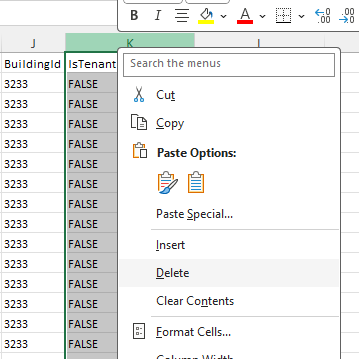
-
Before you enter in data, you must delete all sample data. Make sure that you keep the table header names, however.
The easiest way to do this is to select the first data cell in the table, for example, "1" in the ItemNumber column, then type CTRL+SHIFT+END, then press DELETE.
IV. HARD COST BUDGET TRANSCRIPTIONS
This section applies to transcribing AIA G703-type documents for use in Site Visit Reports. It is typically known as the Hard Cost Budget. Consultants may refer to it as HCB, SV, AIA, G703, etc.
In general, if the project has multiple buildings or tenant improvements, it is the job of the Consultant, in the body of the request email, to provide the building names and IDs or TI names and IDs. If the consultant fails to provide this information and you see that it is required, be sure to request this info from the consultant before proceeding with the transcription.
-
All budgets must have, at minimum, the following columns filled in:
ItemNumberDescriptionScheduledValueGMSchedValue(=ScheduledValue)
-
Always delete columns
ItemTypeandRSDivision(We autopopulate those) -
If the budget does not have any change orders, delete the
IsChangeOrdercolumn. -
If the column does have Change Orders, enter
TRUEin the cell, else enterFALSE. -
If the budget has a column called "Percent Complete" or similar, and the value is 100%, enter
TRUEin theItemCompletecolumn, else enterFALSE. -
If the project does not have multiple buildings, delete columns
IsBuildingandBuildingId -
If the project does have multiple buildings, enter
TRUEintoIsBuildingand the Building Id provided to you into theBuildingIdfield. -
If the project does not have tenant improvements (most projects), delete columns
IsTenantImprovementandTenantImprovementId -
If the project does have TIs, enter
TRUEintoIsTenantImprovementand the TI Id provided to you into theTenantImprovementIdfield.
V. PLAN AND COST BUDGET TRANSCRIPTIONS
This section applies to transcribing budgets for use in Plan and Cost reports. It is almost always abbreviated PNC, but you may see PCR.
-
All budgets must have, at minimum, the following columns filled in:
ItemNumberDescriptionContractorsValueConsultantsValue(=ContractorsValue)IsBuildingBuildingId
-
Always delete columns
ItemTypeandRSDivision(We autopopulate those) -
If the consultant has not mentioned any thing about
IsValueCopied,OwnersWork, orAllowance, delete those columns respectively. -
If an item refers to a building, set
IsBuildingtoTRUEand enter the building Id intoBuildingId -
If an item refers to the project as a whole, not a specific building, enter
FALSEintoIsBuildingand leaveBuildingIdempty.